Miles for iPhone and iPad

Every trip you take, recorded automatically. Even the flights.

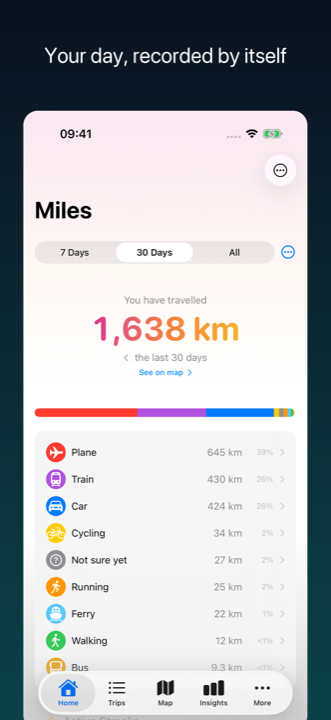
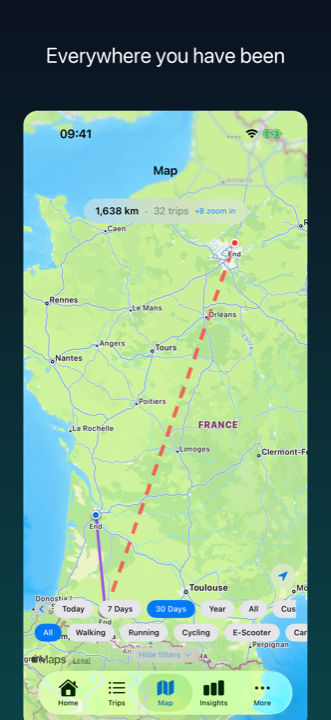
Miles keeps a record of every journey you make, from a morning walk to a long-haul flight. No start button, no account, no login. Install it, go somewhere, and your travel history builds itself: where you went, how you got there, how far it was.

Not out quite yet: the App Store link goes live on release day. Want one email when it ships, and nothing else ever? Write to miles.support.app@gmail.com with the subject "launch".

iPhone and iPad. Requires iOS 17 or later. English, French, German and Spanish.

  • Eleven transport modes, from a walk to a flight
  • Nothing to press. Nothing to sign up for
  • Your trip history lives on your iPhone
Why Miles

Three things it does without being asked.

Keep it for the memories, the maps or the numbers: the year you actually had, everywhere you went, worked out for you without you doing anything.

Every mode, one log, no start button

Walking, running, cycling, e-scooter, car, bus, train, metro, ferry and plane, worked out on your phone from location, motion and the barometer. Motorbike is there too, you tell it once, because it cannot be reliably told apart from a car by sensors alone. Eleven modes in one log. Drive to the station, take the train, walk the last part, and you get three trips with the right mode on each, without touching the app.

When it gets one wrong, and it will sometimes, the fix is a couple of taps on the trip itself. The correction sticks, and Miles learns the simple way: once you have made the same journey a couple of times, the mode that keeps winning on that route counts in favour of the same answer on the next one, and counts for more once the route has five trips behind it. It is one signal among several rather than a rule, so a trip that clearly looks like something else still gets labelled as what it looks like.

A history that is yours, not a company's

Your trips live in a database on your iPhone. There is no Miles account, no login and no Miles server, so there is no company that can change its retention policy, no migration deadline, and nothing to lose access to if a service is discontinued.

The honest flip side, said here rather than in a review: no server also means no cloud copy of your log. There is no iCloud sync in version 1.0. What there is, free on every tier, is Back Up Everything and Restore from Backup in the app's settings: one file that holds your whole history and reads back onto another iPhone.

Private by architecture

No account. No login. No Miles server. Your trip history itself stays on your iPhone; it is never uploaded to us, because there is nowhere to upload it to.

Private Areas: draw a circle around home or work, and what happens inside it is left out of anything you export or share. A CSV export blanks start and end points inside the circle. A shared image drops every route point inside it, not just the ends. Trips touching a Private Area are also kept out of the iPhone search index entirely. Omitted, not blurred. On your own device your trips stay complete.

Export everything as CSV, free, with no subscription. Delete everything in two taps. Raw GPS points are pruned after processing and kept for at most 7 days.

Some things do leave your phone, and we would rather tell you than have you find it in the privacy label. Here is the full list.

How it works

Never lose a flight from your travel history.

Miles is built to sip battery, so it does not keep the GPS running flat out all day. When nothing is happening it drops to a low power watch and waits. That works well on the ground, and it is exactly why it cannot follow you into the air: at cruising altitude there is nothing for a low power tracker like Miles to notice, no network, nothing on screen, so iOS puts it to sleep and eventually shuts it down. Most trackers simply have a hole where your flight was. Miles was built around the hole rather than against it.

  1. Notice the airport

    Miles spots that you are at an airport and writes down what it will need later, before iOS puts it to sleep.

  2. Expect the silence

    In the air, the app gets nothing. It is not fighting for background time and it is not draining your battery trying.

  3. Reconstruct

    When you land and your phone wakes up, Miles pieces the flight back together: the airport where it went quiet, the airport where you reappeared, matched against a built-in list of 4,045 airports, plus the climb and descent your phone's pressure sensor recorded.

What this is not: Miles does not track your plane live, and it does not read your bookings or your email. It works out what happened afterwards, from what your phone measured. No booking, no boarding pass, no button press.

Privacy, in full

What leaves your phone, and what does not.

Most apps put this in a policy nobody reads. Here is the whole thing, in the order that matters.

Stays on your iPhone

  • Your trip history: routes, coordinates, places, distances, times and transport modes
  • Your corrections, and the patterns Miles learns from them
  • Motion and workout data used to classify trips. Nothing is written back to Health
  • Raw GPS points, pruned after processing and kept for at most 7 days

Leaves your phone, and exactly what

  • A single coordinate, to name a place or a nearby station: Apple geocoding, OpenStreetMap Overpass, Transitland and regional public transport services
  • A single coordinate for the weather: Open-Meteo. For elevation on a walk, run or ride, a small sample of points along the route in one request: Open-Elevation
  • One airport and one time window, to name a flight: an open flight registry
  • A request to Firebase Storage for the list of offline map packs, and the pack file itself if one is downloaded: plain file fetches that carry nothing about you
  • Anonymous usage statistics and crash reports, through Google Firebase Analytics and Crashlytics: app opens, onboarding steps, corrections and confirmations, paywall and subscription events, your iOS and app version, device model, and crashes
  • Anonymous per-trip diagnostics, same channel: the transport mode Miles chose and how confident it was, distance, duration, start and end times, speed summaries, and how much of the trip looked like walking, driving, rail or water. Never the route itself
  • One more Google component, Firebase Performance, ships inside the app with its data collection switched off. It is present but sends nothing. It is named here because you would find it if you looked

The analytics contain no coordinates, no place names, no route data and nothing from Apple Health, and they are not linked to an identity, because Miles has no accounts and there is no identity to link them to. Crash reports can only contain fields from a short approved list, and coordinates and place names are not on it. The same filter runs over the analytics before anything is sent, so the rule is enforced in one place rather than relying on every part of the app remembering it.

The lookups are lookups, not uploads. Each one answers a single question and carries no Miles account, because none exists.

Miles is closed source, so you cannot audit the binary. What you can check for yourself: the App Store privacy label, the app's privacy manifest, and a network trace of the app running on your own device.

You can turn the analytics and crash reports off in the app: Settings, then Data & Privacy, then Share anonymous diagnostics. Nothing stops working when you do.

Read the full privacy policy

Pricing

Tracking is free. Always.

The recording, the corrections and the export are the free tier, permanently. Voyager buys the long view: your whole history on the map instead of the last 120 days, and the stories and deeper insight cards built on top of it.

Explorer

Free

Free, permanently.

  • Automatic tracking across 10 transport modes, plus motorbike once you say so
  • Corrections and manual trips
  • Saved locations
  • Core insight cards
  • Your last 120 days on the map
  • CSV export of everything, no subscription needed

Local pricing applies in every storefront where Miles is available. Subscriptions are billed by Apple and renew until you cancel in your App Store settings, and cancelling during the trial costs nothing.

FAQ

Questions people always ask.

How much battery does it use?

Miles is built to sip. It does not keep high accuracy GPS running all day: it asks for more accuracy when you are moving and goes near-dormant when you are not. I have not measured the cost across devices and travel patterns, so I am not going to put a number on it. Check it yourself in Settings, Battery after a week. Apple requires apps like this to warn that continued background GPS use can dramatically decrease battery life; that warning is exactly why Miles uses GPS sparingly rather than continuously. If it is materially worse for you, tell me, because that is a bug report and not a complaint.

What happens when it misses a trip, or gets the mode wrong?

Both happen. Detection is very good, not psychic, and iOS can suspend any app at any time. When a mode is wrong, open the trip and pick the right one: two taps, and it sticks. When a journey is missing entirely, add it manually. Trips Miles is unsure about wait in a short review queue rather than quietly guessing.

If I lose my phone, do I lose my log?

Back Up Everything, in the app's settings under Data, writes a single file holding your whole history: every trip with its route, your saved places, your Private Areas, your achievements. Keep it wherever you keep things. Restore from Backup on the new phone reads it back. Both are free on every tier, because being locked out of your own movement history is the thing we most dislike about this category.

Restoring merges rather than overwrites. Each trip is recognised individually, so restoring onto a phone that already has history adds only what is missing, and importing the same file twice changes nothing the second time.

Your normal iPhone backup should carry Miles to a new phone as well: the database lives in a folder iOS backs up. We say should because we have not run that end to end across two devices yet, so take a backup file too when you change phones. Photos are linked to your photo library rather than copied, so those links may not resolve on a new phone even though the trips do.

There is still no iCloud sync in version 1.0, and it stays top of the list for what comes after. CSV export stays free, but it is for spreadsheets rather than restoring: no routes, no journeys, no photo links, and endpoints inside a Private Area are blanked.

You say private, but you ship Google Firebase. Which is it?

Both are true and neither is hidden. Your trip history stays on your device: there is no account, no login and no Miles server to send it to. Separately, Miles uses Firebase Analytics and Crashlytics for anonymous usage statistics and crash reports, and it sends coordinate lookups to open mapping, weather and transport services to name places, check the weather and identify stations and flights, and for elevation a small sample of route points in one request. The analytics never include coordinates, place names, routes or Health data. The full list is above, and it is deliberately above the pricing rather than below it.

Does it track my flight live?

No. Miles is not running while you are in the air, by design: it is a low power background tracker, and a low power tracker with no signal, no movement it can see and nothing on screen gets suspended by iOS. Miles notices the airport, expects that silence, and rebuilds the flight when you land.

An app you are holding, with the screen on, can still get a GPS fix by a window. What a low power background tracker cannot do is quietly follow you for eleven hours with the phone locked in your pocket, which is the thing Miles is actually trying to be the other 364 days a year.

I came from Google Maps Timeline. What should I know?

Two practical things. Miles cannot import your Timeline history, so your Miles log starts on the day you install it. And Miles has no server, so nothing about your log depends on a company's retention policy.

For context on why people arrive here: Google moved Timeline to on-device storage, only a recent window of history came across for many people, the web view was removed entirely, and Google confirmed in March 2025 that a technical issue had deleted some people's Timeline data.

Do I need an account?

No. There is no sign up, no login, no email address and no password. You install it, grant location and motion access, and that is the whole setup.

Can I get my data out?

Yes, as CSV, free, with no subscription. It is in the app's settings. Data portability is not a paid feature.

Is this a mileage tracker for tax?

No. Miles has no tax rate tables, no business and personal classification workflow and no reimbursement reports. If you need mileage for a tax return, one of the dedicated apps will serve you better. Miles is a log of everywhere you went, for you.

Does it work on iPad? Is there an Apple Watch app?

Miles runs on iPad. There is no Apple Watch app at launch.

Which permissions does it need, and why?

Location set to Always, so trips can be detected while your phone is in your pocket. With "While Using" instead, Miles can only record while the app is open on screen. Motion and Fitness, which is how it tells a walk from a bus ride. Both are asked for during setup, both are explained before the system prompt appears, and both can be declined, in which case Miles still works for manual trips.
Built independently

One developer, in France, more than 140 builds before release.

Miles has no investors, no growth team and no advertising. It took more than 140 internal builds and more than 500 automated tests to get here, and around forty fixes in the tracking code came straight from real journeys that exposed them. Real flights, not simulations, established that a low power background tracker like Miles cannot be awake for your flight, and the flight capture was designed around that fact rather than in denial of it.

Whole features were deleted before launch because they were not good enough yet.

If something looks wrong, say so, and it gets fixed. Support goes to one person and it is answered by that person.

Visit support